Electrician website: what customers need before they enquire
Plan an electrician website with clear services, a useful enquiry form and honest evidence. Includes a handover checklist, local search basics and a labelled demo example.
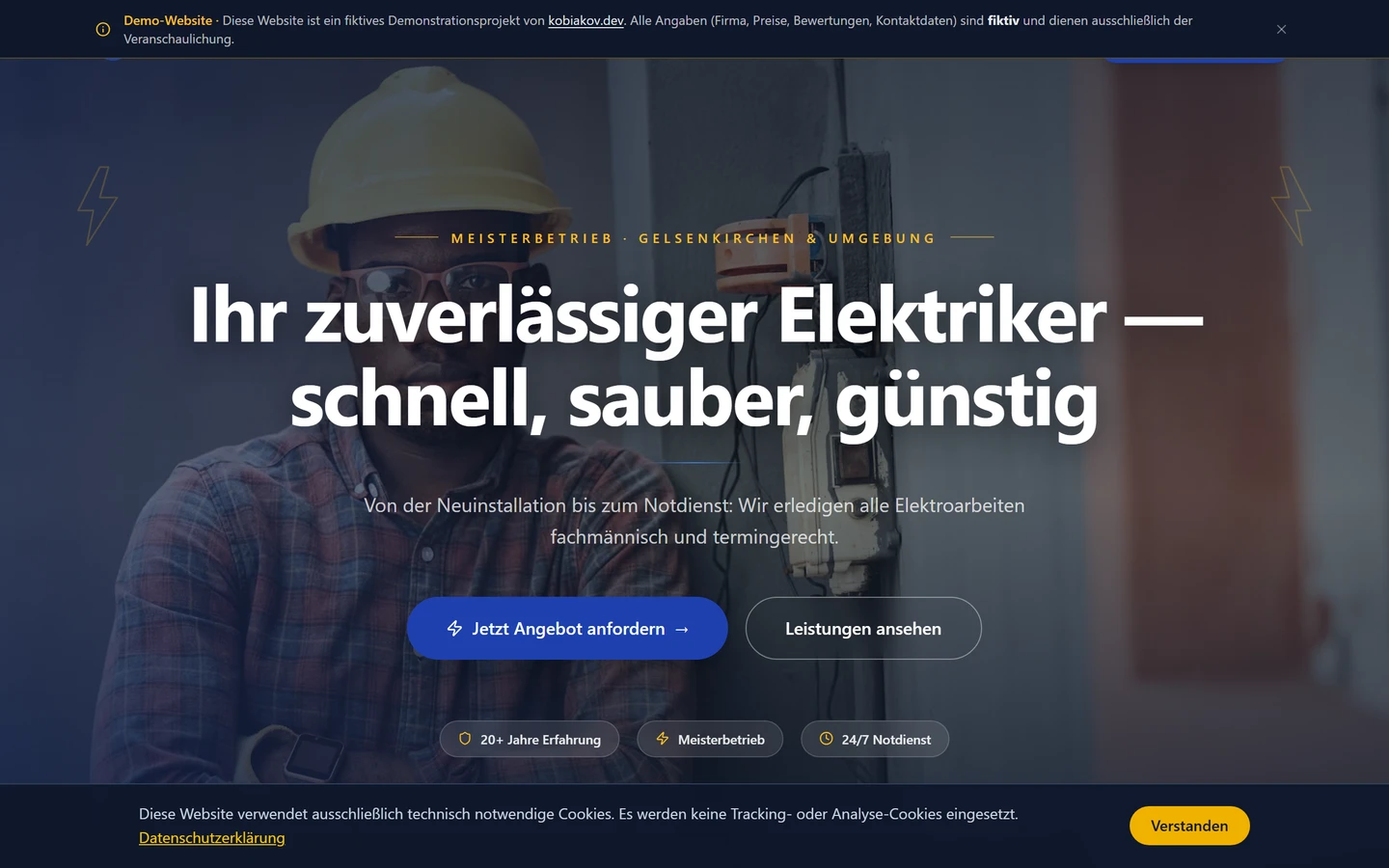
Commissioning a website for an electrical business takes more than choosing an attractive homepage. A potential customer needs to understand whether you handle their project, cover their area and offer a clear way to enquire.
Those three questions make a useful starting point. This guide sets out a practical structure for a small electrical business, using my Elektro Becker demo project as a visual reference. It represents a fictional business and demonstrates design and functionality. It is not a client project with measured growth in enquiries.
1. The first screen: service, area and next step
“Your reliable partner for all things electrical” does not explain whether you modernise homes, maintain commercial premises or accept smaller repair jobs. Start with the work you actually offer and want customers to request.
A possible planning example:
Electrical installation and modernisation for homes and business premises. Tell us where the property is and briefly describe your project.
Add your real service area and a visible contact option. A button labelled “Enquire about a project” describes the next step more clearly than “Learn more”.
On a phone, both the telephone number and enquiry route should be easy to reach. Only advertise an emergency service if you operate one, with accurate availability. Sending a standard form is not a confirmed call-out booking.
2. Explain services through the customer's situation
A list of technical terms gives a homeowner little help. For each important service, describe when someone might need it and what happens first. For example:
- Home modernisation: Which rooms and types of project can customers ask about?
- Lighting: Do you handle replacements, new designs or commercial spaces?
- EV charging: What needs discussing before an initial assessment, if this is a service you offer?
These are content-planning examples, not claims about Elektro Becker's service range. Remove anything your own business does not provide.
A compact website may be enough for a focused service and audience. Separate service pages become useful when each can answer different questions and show its own process and genuine examples. Ten pages that swap a town name do little to explain the offer.
3. An enquiry form for planned work
Aim for a useful initial description rather than a complete technical survey. For many planned projects, these fields are a sensible starting point:
- Type of work: a short selection with a free-text field.
- Town or postcode: to check your service area.
- Property type: such as a flat, house or commercial premises.
- Preferred timeframe: a planning window, not a promised appointment.
- Name and a suitable way to reply.
Optional photos can help, but they do not replace a professional assessment on site. Never ask someone to remove covers or touch electrical equipment to take a picture. Uploading an image should not automatically produce something presented as a binding quotation.
After submission, the page should explain whether the message was sent. “Enquiry received” and “Appointment confirmed” mean different things. Before development, agree where messages arrive and who handles them. The delivery flow is only checked when a test enquiry reaches the intended inbox.
4. Trust: real work and clearly labelled examples
A project reference does not need elaborate copy. A photo approved for publication, a short description of the task and the work actually performed can be useful. Avoid exposing customer details, addresses or private interiors without permission.
Only include qualifications, reviews and partner logos that can be substantiated and used with permission. A demo design containing sample content does not prove revenue, customer satisfaction or search rankings.
Use the interactive Elektro Becker demo to discuss structure and visual design. Please do not enter real customer or project details in its form. The scope of your own website needs to be agreed separately.
5. Local visibility without buying ads
Start with the basics and a clear connection between the business profile and website:
- Google Business Profile: Keep real business details, category and information accurate. Google identifies relevance, distance and prominence as key local ranking factors. A specific position cannot be bought or guaranteed. Google's local ranking guidance.
- An accurate service area: If you only visit customers and do not receive them at your address, a service-area profile is relevant and Google requires the address to be hidden. Do not invent branches. Business Profile guidelines.
- Useful pages rather than town-name copies: Explain real services and local experience. Near-identical city pages funnelling people to the same offer can fall under Google's doorway abuse policies. Google's spam policies.
A useful next article could document a real job: the starting situation, work performed and information that helped with the initial enquiry. Ask genuine customers neutrally for an honest review, without rewards or selecting only happy customers. Google's guidance on review requests.
6. What to settle before hiring a web developer
A clear scope makes proposals easier to compare. Prepare answers to these questions:
- Which services and locations should the website cover?
- Which photos, texts and supporting evidence already exist?
- Do you need an enquiry route or actual appointment management?
- Who owns the domain and accounts, and who updates the content?
- Where do enquiries go, and what happens if delivery fails?
- What ongoing costs and maintenance tasks are involved?
For a business operating in Germany, privacy information and required legal pages need to reflect the actual form, hosting and services used. A generic “GDPR compliant” badge in the design does not settle those questions.
7. How to accept the finished website
Open it on a real smartphone and work through a planned project. Can you find the relevant service and service area? Does the telephone link work? Are incomplete fields explained clearly? Does a valid test enquiry arrive, and does the confirmation describe the real next step?
Later, measure page visits, contact clicks, received enquiries and suitable projects separately. A telephone click is not a completed conversation, and extra visits are not extra contracts. A website can improve the enquiry route; it cannot guarantee demand.
Planning a website for your electrical business?
See a possible structure on the trades website page. Your services, service area and preferred enquiry route are enough to start a practical discussion.
Explore a trades websiteYou can also describe your project through the contact page. If you already have a website, it provides a concrete starting point for discussing what to keep and what currently makes enquiries harder.